Modulr
Content Management System Online Manual
Home
Concepts
Accessing the System
Toolbar
Navigation
Editing Sections and Content
Editing Content
Editing Section Settings
Publishing Changes
Meta Data
Responsive Mode
Managing Pages
Forms
Design Elements
Site Structure
Page Templates
Fonts
Colors
Type / CSS Elements
Custom Section Types
Site Settings
Categories
OAuth Settings
Social Media
Managing Admins and Editors
User Accounts
Cart Settings
Maintenance
Perform Updates
Rendering Styles
Processing & Cleaning Images
Design Elements
Purpose
A set of tools to control site-wide settings:
Site Structure
Page Templates
Fonts
Colors
Type/CSS Elements
Custom Section Types
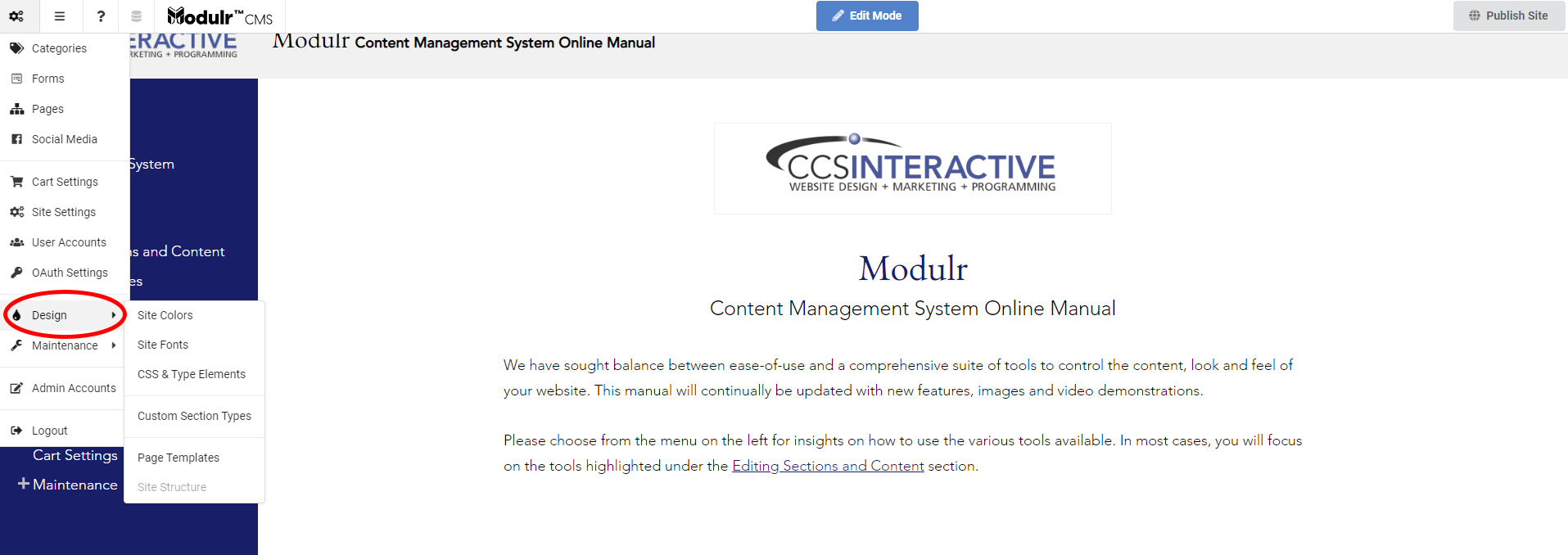
How to Locate Design Elements
Beneath the URL in your browser, hover your mouse over the toolbar
It will drop down, and all of the options will become available
Navigate to the
settings menu
⇒
scroll down to
Design
⇒
click the appropriate
Design Element