Navigation
Purpose
How to navigate through Specific Pages, Hidden Pages, and Navigation Alternative.
How to Move to Specific Pages
1. You can use your website's normal navigation menus to get around
2. The toolbar will update as you move from page to page
3. For alternative ways of navigating or accessing hidden pages, see below.
INSERT VIDEO "navi to diff pgs"
How to Navigate to Hidden Pages
Your site may contain any number of hidden pages, either because they are works-in-progress that are waiting to be made public, are system-generated pages like Login and Logout that may not have direct links in your site navigation, or are behind a members only area. These can be reached under the Hidden Pages menu.
- Beneath the URL in your browser, hover your mouse over the toolbar
- It will drop down, and all of the options will become available
- On the left, locate the menu icon (3 horizontal lines) ⇒ select Hidden Pages
How to Navigate Alternatively
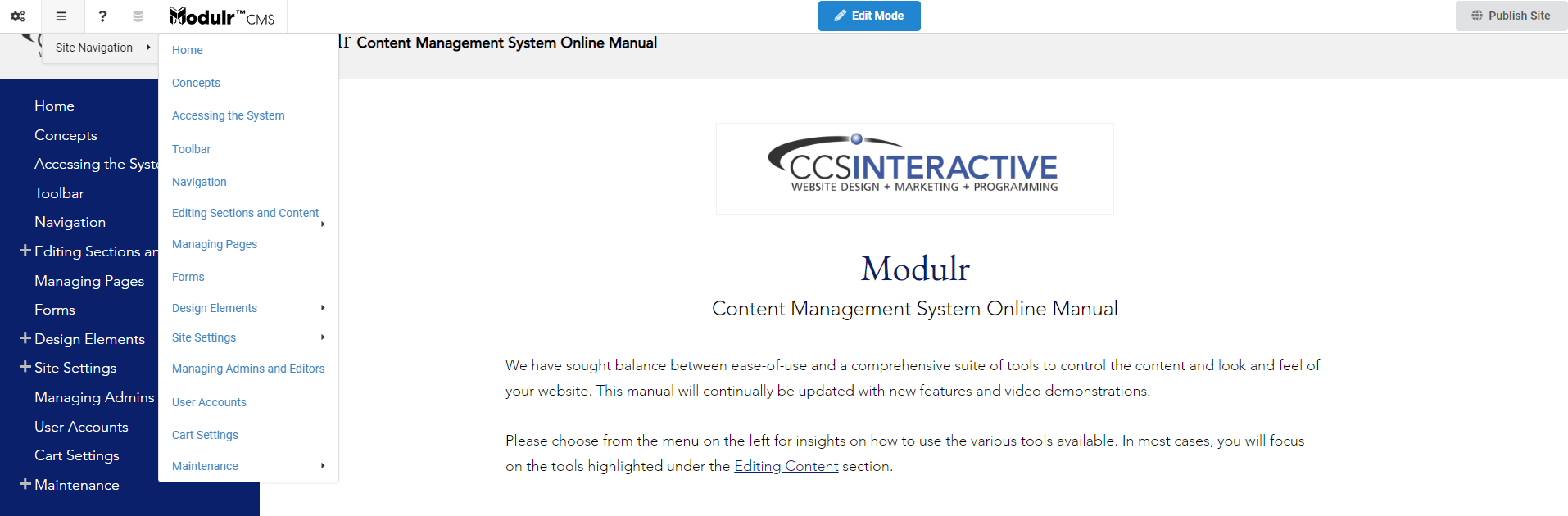
Each of the pages can be accessed through the toolbar.
- Hover your mouse over the toolbar
- On the left, hover over the menu icon (3 horizontal lines) ⇒ Site Navigation ⇒ Choose the desired page from the organized dropdowns